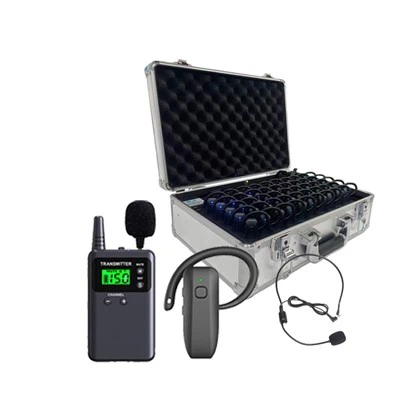
Most write-ups on "optimizing" a tour guide system read like generic electronics advice - compress the audio, add a nicer app, call it a day. In practice, the systems that hold up in a working museum or a 40-person factory tour are optimized around a much narrower set of decisions: how the hardware survives daily handling, how reliably it triggers content indoors, and how it behaves in a room full of other wireless devices. Below is what we, as a manufacturer of wireless tour guide systems, actually see move the needle.
1. Hardware: Build for Daily Wear, Not Just Specs
A spec sheet can promise clear audio and long battery life; daily use in a venue is what actually tests it.
Housing and connectors. Receivers get dropped, clipped to lanyards, and passed between hundreds of hands a day. Reinforced housings and recessed charging contacts reduce failure rates far more than any software tweak. Our L8 receiver, for example, is built around this kind of daily-handling durability rather than headline specs alone.
Battery life vs. charging workflow. For venues running back-to-back tour groups, the real constraint isn't peak battery capacity - it's how fast a full cart of receivers can be charged between groups. A charging case that brings receivers from empty to usable in under an hour matters more to a venue operator than an extra two hours of standby time.
Weight and wearability. Lightweight, low-profile receivers - our L8 Mini-class units run under 40 grams - reduce visitor fatigue on longer tours, especially for elderly visitor groups or multi-hour factory walkthroughs.
2. Signal Design: Anti-Interference Matters More Than Range on Paper
Advertised transmission range is measured in open, interference-free conditions. Real venues are not interference-free.
Systems operating in the 800–960 MHz band (as our 008A and L8 systems do) are chosen specifically because this range offers a workable balance of wall penetration and available channel space in crowded RF environments - museums with Wi-Fi access points, security systems, and dozens of other tour groups running simultaneously.
The practical anti-interference measures that matter:
Frequency-hopping spread spectrum (FHSS) transmission, which shifts the signal across channels rapidly to avoid a single point of interference - not a vague "anti-interference chip" claim.
Multi-channel isolation, so multiple tour groups in the same hall don't bleed into each other's audio.
Adequate channel count for venues running many simultaneous groups - this is a real differentiator between entry-level and professional systems.
If a system's marketing only says "interference-resistant" without naming the underlying technology, that's worth asking the supplier to clarify.
3. Indoor Triggering: Beacon and Infrared, Not GPS
Automatic triggering - where a receiver starts playing the relevant clip as a visitor approaches an exhibit - is one of the more visible features to get wrong.
GPS works outdoors, but GPS accuracy degrades sharply indoors due to building materials blocking satellite signals; it is not a reliable trigger for gallery-to-gallery movement inside a museum. Indoor automatic triggering in practice relies on:
Bluetooth beacons placed near exhibits, detected by the receiver at a set proximity, or
Infrared transmitters, which trigger only within a tightly defined line-of-sight zone - useful where adjacent exhibits are close together and beacon overlap would cause false triggers.
Outdoor routes (garden tours, campus walks, factory grounds) are where GPS-based triggering is appropriate. Matching the triggering technology to indoor vs. outdoor use is a more useful design question than treating "automatic triggering" as a single feature.
4. Content Management: What Actually Needs Updating
Content quality matters, but the operational bottleneck for most venues isn't recording quality - it's how painful it is to update content later.
Look for:
Local update capability without needing to re-flash every receiver individually, especially for venues with dozens or hundreds of units in circulation.
Multilingual content swapping that doesn't require re-recording the entire tour when one language track needs a correction.
Offline-first storage, since most museum basements, historic sites, and factory floors have unreliable or no Wi-Fi coverage - content should live on the device, not stream from a server.
5. Real-World Testing Before Deployment
Lab conditions rarely match opening day. Before a full rollout, it's worth testing:
Signal behavior with the venue at expected peak occupancy, not empty
Battery drawdown across a full day of back-to-back tour groups, not a single charge cycle
Trigger accuracy in the specific rooms where exhibits sit close together
Venues that skip this step tend to discover interference and triggering issues in front of their first paying visitors rather than before.
6. Matching the System to the Venue Type
There isn't one "optimized" configuration - a factory tour, a cathedral, and a national park have different constraints:
| Venue type | Priority | Fit |
|---|---|---|
| Museums / indoor exhibits | Beacon-based triggering, multilingual content | L7, L8 |
| Factory / industrial tours | Durability, long transmission range in open floor plans | 008A |
| Outdoor / campus tours | GPS triggering, longer battery life | B7-series |
FAQ
Does GPS work for indoor museum tours? No. GPS accuracy drops significantly indoors because building materials block satellite signals. Indoor triggering should rely on Bluetooth beacons or infrared transmitters instead.
What does anti-interference actually mean in a tour guide system? It typically refers to frequency-hopping spread spectrum (FHSS) transmission and multi-channel isolation, which let a system keep working reliably even when many other wireless devices or tour groups are operating nearby. A vague claim of "anti-interference" without naming the mechanism is worth questioning.
Do audio tour guide receivers need Wi-Fi to work? No. Well-designed systems store tour content locally on the receiver, so they function fully offline - important for venues with poor or no internet coverage.
How often should tour content be updated? As often as exhibits change or factual corrections are needed. The key requirement is that updates shouldn't require re-flashing every receiver individually or re-recording an entire multilingual tour for a single correction.